
quest_poi_points
Structure
| Field | Type | Attributes | Key | Null | Default | Extra | Comment |
|---|---|---|---|---|---|---|---|
| QuestID | int | signed | PRI | NO | 0 | ||
| Idx1 | int | signed | PRI | NO | 0 | ||
| Idx2 | int | signed | PRI | NO | 0 | ||
| X | int | signed | NO | 0 | |||
| Y | int | signed | NO | 0 | |||
| Z | int | signed | NO | 0 | |||
| VerifiedBuild | int | signed | NO | 0 | |||
Description of fields
QuestID
references quest_template.ID and quest_poi.QuestID
Idx1
Used to group multiple entries from quest_poi.id. You must manually increment this value by 1 for each new row in quest_poi_point with the same questId (0, 1, 2, 3...).
Idx2
Used to group multiple entries in the quest poi points to draw the polygon for that point of interest. The actual points are the corners of each polygon.
Example quest: Secret Communication.
| QuestID | Idx1 | Idx2 | X | Y | VerifiedBuild |
|---|---|---|---|---|---|
| 8318 | 3 | 0 | -6231 | -51 | 0 |
| 8318 | 3 | 1 | -6236 | 19 | 0 |
| 8318 | 3 | 2 | -6241 | 52 | 0 |
| 8318 | 3 | 3 | -6316 | 282 | 0 |
| 8318 | 3 | 4 | -6413 | 282 | 0 |
| 8318 | 3 | 5 | -6483 | 250 | 0 |
| 8318 | 3 | 6 | -6483 | 217 | 0 |
| 8318 | 3 | 7 | -6326 | -7 | 0 |
These points are all the little corners on the blue box. idx1 represents an area defined by the points of idx2 to draw the shape. 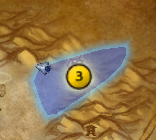
X
The X position of the question mark on the MapID.
Y
The Y position of the question mark on the MapID.
Z
- no description -
VerifiedBuild
This field is used by the TrinityDB Team to determine whether a template has been verified from WDB files.
If value is 0 then it has not been parsed yet.
If value is above 0 then it has been parsed with WDB files from that specific client build.
If value is -1 then it is just a place holder until proper data are found on WDBs.
If value is -Client Build then it was parsed with WDB files from that specific client build and manually edited later for some special necessity.